A PC Engine Hello-World Template
I’ve been doing a fair amount of homebrew and retro dev recently — most visibly on From the Dead, the post-apocalyptic action-RPG I’ve been writing in pure assembly for the Commander X16, Neo6502 and Agon Light 2 — and it’s got me thinking about which other 8 and 16-bit machines could reasonably host a port. The one that keeps tugging at me is the NEC PC Engine (or TurboGrafx-16 if you grew up the other side of the Atlantic). Tiny HuCard, great sprite hardware, a 65xx-family CPU I’m already comfortable with — it ticks a lot of boxes.
Before I commit to porting anything, though, I wanted to know what the development experience actually feels like. Can I get a working build and run cycle on Linux? Is there a debugger? Will it slot into my normal VSCode workflow? The cheapest way to answer all of that is to put together a project template, write a simple Hello, World, and see how the pieces fit.
So that’s what I’ve done. The repo lives here: pc-engine-template.
The toolchain
The PC Engine’s CPU is the HuC6280 — a 65C02 derivative with extra opcodes and a paged memory model. I assumed cc65/ca65 would handle it the way it handles the X16 and the Neo, but no: ca65 doesn’t speak HuC6280. The community standardised years ago on PCEAS, the assembler that ships with the HuC toolchain. Once you accept that, the rest falls into place quickly — HuC also gives you pcxtool (graphics), mml (music) and wav2vox (ADPCM samples), so the asset pipeline story is sorted before you even start.
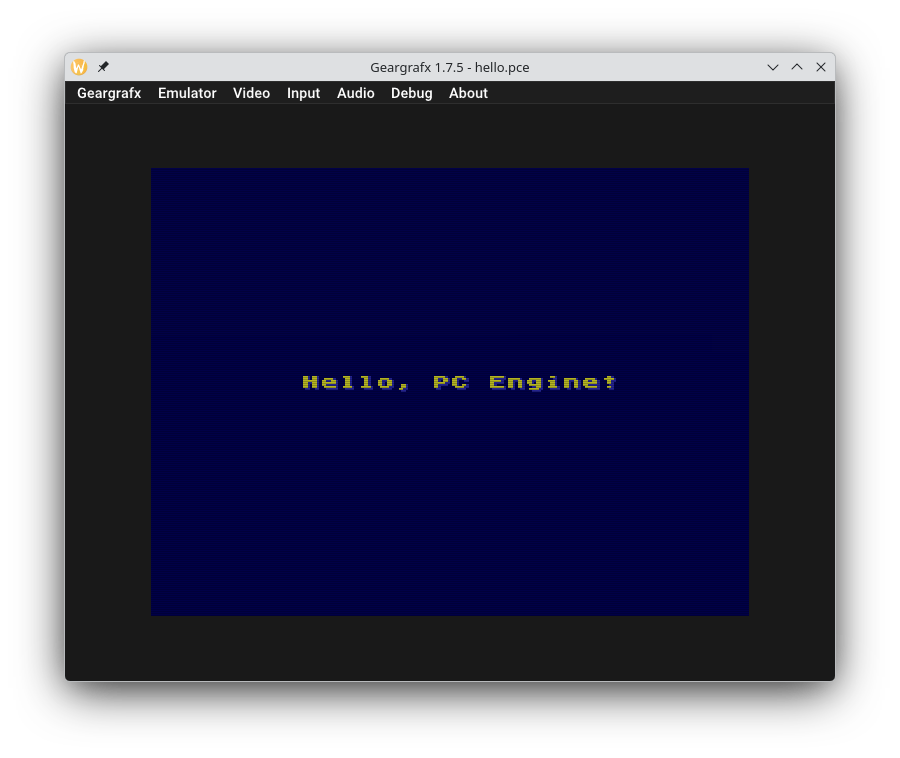
For an emulator I went with Geargrafx. It’s a portable ELF on Linux, has a proper debugger built in, and — the bit that sold it for me — auto-loads PCEAS .sym files when they sit next to the ROM. That gives me source-level breakpoints and stepping with zero extra config. The Makefile passes -gA to PCEAS so the symbol file drops out of every build automatically.
The CORE(not TM) library
The other thing that made this much less painful than I’d feared is John Brandwood’s CORE(not TM) library, which ships inside the HuC examples directory. It owns the reset vector, the IRQ kernel, MPR setup, a 256×224 video init, an 8×8 font dropper and a joypad reader that runs on every vsync. In other words, all of the bring-up work that you don’t really want to write from scratch on a machine you’re still learning.
The template references CORE via PCE_INCLUDE rather than vendoring it, so any HuC update flows straight through. If I ever want to replace it with my own HAL, dropping a parallel bare-startup.asm into src/pce/system/ wins because the include path is searched in order. Nice and unobtrusive.
The Hello, World
The actual hello-world is about 110 lines of PCEAS in src/pce/app/boot.asm. It:
- Brings up a 256×224 display via CORE’s
init_256x224. - Uploads an 8×8 ASCII font into VRAM with
dropfnt8x8_vdc. - Programs palette 0 with a CPC-464-inspired set of colours (old habits — that yellow-on-dark-blue is the Amstrad’s default startup look and I can’t help myself).
- Pokes the message into the BAT with
vdc_di_to_mawr. - Calls
set_dsponand idles onwait_vsync.
That’s it. A working ROM that prints Hello, PC Engine! in the middle of the screen.
Project layout
I followed the same three-tier split I’ve been using on my other retro projects, because it’s worked well across X16, Neo6502 and Agon — and it means the muscle memory transfers when I’m bouncing between them:
src/pce/app/— top-level entry plus per-screen modules as the project grows (title, intro, room, etc.).src/pce/engine/— portable game systems: tilemap painter, sprites, collision, palette fades, menus, text, timer, input edge-detect, asset loader.src/pce/system/— hardware-facing HAL plus project equates.platform.inccentralises the VRAM layout decisions, and this is where any project-specific HAL extensions (CD-ROM helpers, SuperGrafx flags, MB128 saves) would live once I outgrow what CORE gives me.
The assets/ and scripts/ directories are stubs for now, but the table in the README maps out where pcxtool, mml and wav2vox outputs will land once I start feeding real artwork through the build.
VSCode integration
I do most of my retro work in VSCode, so the template ships a .vscode/ directory with workspace tasks for every Makefile target — build: pce is the default Ctrl+Shift+B, with siblings for run, load, clean and package. Build output routes into the Problems panel via the $gcc matcher; run/load tasks open a dedicated terminal so emulator output doesn’t clutter the build pane.
For syntax highlighting I’m using code-ca65 — it’s not PCEAS-specific but ca65 and PCEAS are close enough cousins that the highlighting holds up — together with asm-code-lens for symbol navigation and hovers. The full extension recommendation list is in extensions.json, including the Python bundle (and Ruff) for the asset-pipeline scripts that’ll arrive once pcxtool gets wired up.
make run vs make load
A small ergonomics thing I picked up from the Neo and X16 work: I always end up wanting two ways to start the emulator. make run builds and immediately auto-loads the ROM — that’s the fast path you use a hundred times a day. make load builds, prints the absolute paths to the artefacts, and launches Geargrafx without a ROM loaded, so I can start a screen recorder first and then load the ROM via the menu to capture a clean boot sequence. It’s the difference between “iterating” and “shooting the trailer”, and once you’ve recorded a video that starts halfway through the boot chime, you’ll add it to every template you ever write.
What’s next
The whole point of the template is to be a launchpad, so the next thing I’ll do is start filling in the engine layer — text, menu, input edge-detect, palette fade — pulled across from the equivalents on the other ports. After that I’ll wire up the asset pipeline (PNG → PCX → pcxtool → PCE-format blob; Pillow handles the first hop in two lines of Python) and start moving room tiles and sprites across.
And then, assuming the development experience holds up the way the Hello, World suggests it will — yes, I think a PC Engine port of From the Dead is on the cards. More on that once the engine layer is alive.
If you want to grab the template yourself, it’s on GitHub: pc-engine-template. MIT-ish licensing, CORE is Boost-licensed, and the README has the full toolchain-install walkthrough. If you spot anything I’ve got wrong — particularly anyone who’s been writing for the PCE for longer than a fortnight — please do drop me a line.